
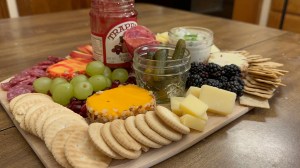
This week, I am using continuity to make a how-to video showing someone how to make their own charcuterie board.
Reading & Writing
Chapter 3 of “The Bare Bones Camera Course for Film and Video” by Tom Schroeppel goes over what a basic sequence is. He explains that a sequence is a series of shots that are used to break up a long scene to make a video more interesting for the viewer. It uses a mixture of wide shots, medium shots, close ups, and cutaways at different lengths to tell a story. Wide shots establish the subject and scene, while close ups show more details of what is happening. Cutaways let an editor easily change the length and order of the sequence to enhance the message.
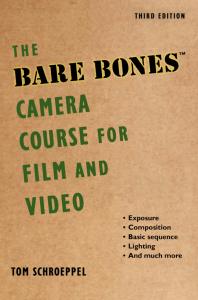
When shooting a sequence, each shot should be different in size and camera angle. This makes it easier to cut back and forth between shots when editing. One technique editors use in a sequence is “cutting on the action”. It allows for smoother transitions and continues the movement in a scene through different shots. Schroeppel explains this through an example of a man taking off his hat. He starts the action in a wide shot, but then the editor cuts to a medium shot to show him finishing the removal of the hat. Another important note for sequences is entrances and exits. When a subject moves into a scene, their exit should be shown as well. Shooting like this gives more flexibility to the editor.
In chapter 4, Schroeppel talks about screen direction, which is the direction people and things face when viewed through the camera. It is determined by the axis on the action. That axis can be visualized as a line. When you cross that line, you change the screen direction of everything the viewer sees, even if nothing has moved besides the camera. For example, if a person is looking to the left and the camera moves, they will be looking towards the right. This confusers viewers, who only see what you show them. They would think the person has turned around completely when they have not. Photographers must keep the line in mind always, but it can be crossed in some circumstances. Without confusing viewers, the subject can change direction in the frame or the camera can move with the action. The line can also be crossed if a neutral shot, like a close up or POV shot, is used in the middle. Overall, Schroeppel says as long as you don’t cross the line and you keep the same screen direction, you can move the subjects and the camera as much as you want.
Research to Inform
To get a good idea of what I need to do to make a successful how-to video, I researched other videos that focus on continuity.
Cookie Recipe Video
This is a how-to video about making cookies. There are multiple angles used and edited together to look like each step is one continuous motion. The editor generally started with a wider shot and zoomed in closer to get a look at the details of the process, but the transitions look smooth.
Riding a Bike Video
This is another how-to video that gives parents tips on teaching their child to ride a bike. There were at least two cameras used when filming this tutorial because the editor cuts between wider and closer up shots of the child riding his bike. This is specifically shown at 2:26.
Decorating a Cake Video
This video shows the audience techniques for decorating a cake. There is continuity used throughout the entire video and it is clearly multiple cameras were used. For example, at 1:43, we see at least 4 different shots edited together to show one motion. It makes the viewer feel like they are getting a closer look at the action. Some of the clips are also sped up to make the video flow better.
How to Make a Charcuterie Board
This video lays out all the steps for someone who wants to make a charcuterie board. They are great for parties or a night in, and are one of my favorite things to make. Every board is different and customizable.
To make the how-to video, I used two iPhone cameras. One stayed on a tripod above the board from a birds eye view angle and the other got moved around on a different tripod to get side angles.
For editing, I found fun, upbeat music that fit the tone of the video and layered each clip in Adobe Premiere Pro to create a continuous effect. I added text with transitions and sped up some clips that dragged on. It was a fun video to create and definitely a rewarding snack after hours of filming!
 Katie Coen
Leave a comment